
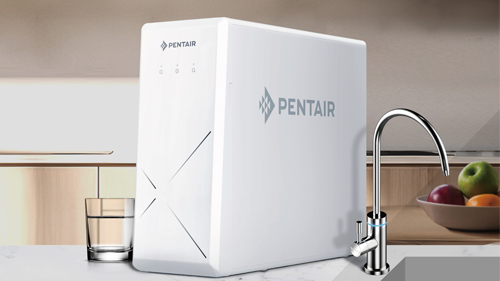
The need for clean and stable water continues to increase, both for households and for business activities. Quality water helps daily activities run smoother and makes equipment last longer. That is why a water filter is an important part of maintaining long-term water quality.
One option that is widely used because of its compact and practical design is Pentair EZ3000. The unit is installed on the water line and maintained by replacing the cartridge, so both installation and routine maintenance are simple.
This article covers the complete Pentair EZ3000 water filter installation tutorial, from preparation and installation to flushing before use.
Getting to know the Pentair EZ3000 Water Filter
Pentair EZ3000 is a water filter installed directly on the PDAM tap line. This design makes the filtration system work efficiently without requiring large space, and the cartridge concept makes maintenance easier.
The main advantages of Pentair EZ3000 include:
- Compact and modern design
- Easy and fast installation
- Suitable for homes, apartments, offices, and businesses
- Helps improve water quality
- Provides a more comfortable water usage experience
With these characteristics, Pentair EZ3000 is a practical choice for users who want a simple installation process.
Preparation Before Pentair EZ3000 Installation
Good preparation will result in a neater, safer, and easier-to-maintain installation.
Determine the Installation Location
Choose a location that is:
- Easy to reach for maintenance
- Near the main pipe line
- Not exposed to direct heat
- Provide a comfortable and clean workspace
The right location helps the filter work more stably and makes periodic checks easier.
Ensuring the Water Line is Ready
Make sure:
- Pipes and water lines are in good condition
- No leaks
- Water pressure is stable and safe
This step ensures the installation process runs smoothly from the start.
Opening and Checking the Pentair EZ3000 Unit
Before installation, unpack and check. Typically the Pentair EZ3000 package contains:
- Main filter unit
- Filter cartridge inside the housing
- Inlet and outlet connections
- A brief guide to use
Make sure all components are in good condition and ready for installation.
Pentair EZ3000 Water Filter Installation Steps
This section is the core of the Pentair EZ3000 water filter installation tutorial.
1. Turning Off the Main Water Flow
Close the main water tap or valve before installation. This step prevents leaks and keeps the work area dry.
2. Determining the Direction of Water Flow
Pay attention to the arrow on the filter body. The correct flow direction makes the filtration process work as intended.
3. Installing the Inlet and Outlet
Install the pipe connection with:
- Seal tape sufficiently
- Firm but not excessive tightening
Proper connection results in a strong, neat, and leak-free installation.
4. Ensure Stable Filter Position
Make sure the filter is installed straight and does not weigh down the pipe. A stable position makes the unit last longer.
5. Connection Check
Double check all connections before the water flow is opened, then continue to the flushing stage.
Pentair EZ3000 Water Filter Initial Flushing Process
After the cartridge is installed, the Pentair EZ3000 water filter needs to be flushed before first use. Flushing removes residual fine particles from the new cartridge and stabilises the flow before the water is used.
Proper flushing helps:
- Remove residual fine particles from the new cartridge
- Stabilise the water flow
- Produce clearer water
- Maintain filter performance from the start of use
Pentair EZ3000 Flushing Procedure
Flushing is done in cycles. Follow the manufacturer’s instructions on the packaging or unit manual; an example of one cycle is as follows:
- Turn on the tap of the filtration water
Let the water flow steadily for 30 minutes. - Stop the water flow and let the unit stand
After 30 minutes, turn off the water flow and let the unit stand for 3 hours. - Re-flushing
After 3 hours, turn on the filtration water tap again and let the water run for 20 minutes.
The above steps count as one flushing cycle.
Number of Flushing Cycles
The number of cycles follows the manufacturer’s instructions on the packaging or unit manual.
By completing this entire cycle, the Pentair EZ3000 will:
- Work with stable performance
- Produce more consistent water quality
- Maintain cartridge service life
Final Check After Installation
After flushing is complete, do a final check:
- Make sure there are no leaks
- Ensure normal water flow
- Make sure the water pressure is stable
If all goes well, the Pentair EZ3000 installation can be declared successful and ready for use.
Benefits After Pentair EZ3000 Installation
With proper installation and flushing, you will experience the following benefits:
- Water feels cleaner and fresher
- Daily activities are more comfortable and efficient
- Household appliances last longer
- Water quality is more stable in the long run
Cover
Through this Pentair EZ3000 water filter installation tutorial, it can be concluded that the installation and flushing process can be done easily, safely, and systematically.
Proper installation is not just a technical matter, but also about maintaining the quality of the water you use every day.
Do you want your Pentair EZ3000 water filter installation to be easier and neater? Our team is ready to help you choose a solution that suits the water conditions in your home or place of business, from product consultation and installation guidance to maintenance recommendations.
👉 Contact us